
Installing and connecting PressKit
PressCal lives in the browser. Your files live on the disk. PressKit is the desktop app (Windows) that joins the two: it opens folders, creates the folder for every job, links PDFs to the imposition, runs preflight, converts files and exports the imposition as a press-ready PDF.
Do I have to have it?
Not to get work done. Without PressKit, PressCal is a regular web app: costing, quotes, jobs, calculator — all of it works. You can even upload a PDF from the browser to see it on the imposition, but the file isn't stored and it gets no folder.
With PressKit you unlock:
- File management straight from your own computer
- Linking a PDF to the imposition, with live preview and dimensions filled in for you
- Exporting the imposition as a print-ready PDF
- Preflight file checks (analysis, colours, DPI)
- An automatic job folder for every approved quote
- Opening folders and drag & drop from inside PressCal
Setup in three steps
Go to Settings → PressKit. The wizard has exactly three steps.
1. Install — hit "Download for Windows" and run the installer. Already have it on this computer? Skip to 2.
2. Connect — hit "Connect". PressKit opens by itself and configures itself; you copy no key and type nothing. If its window closes and reopens, that's normal — it's switching profile.
3. Done — the moment PressKit talks to PressCal, the page shows it on its own. No refresh needed.
If PressKit is not installed on this computer, the "Connect" button does nothing at all — that's not a fault, that's step 1 missing.
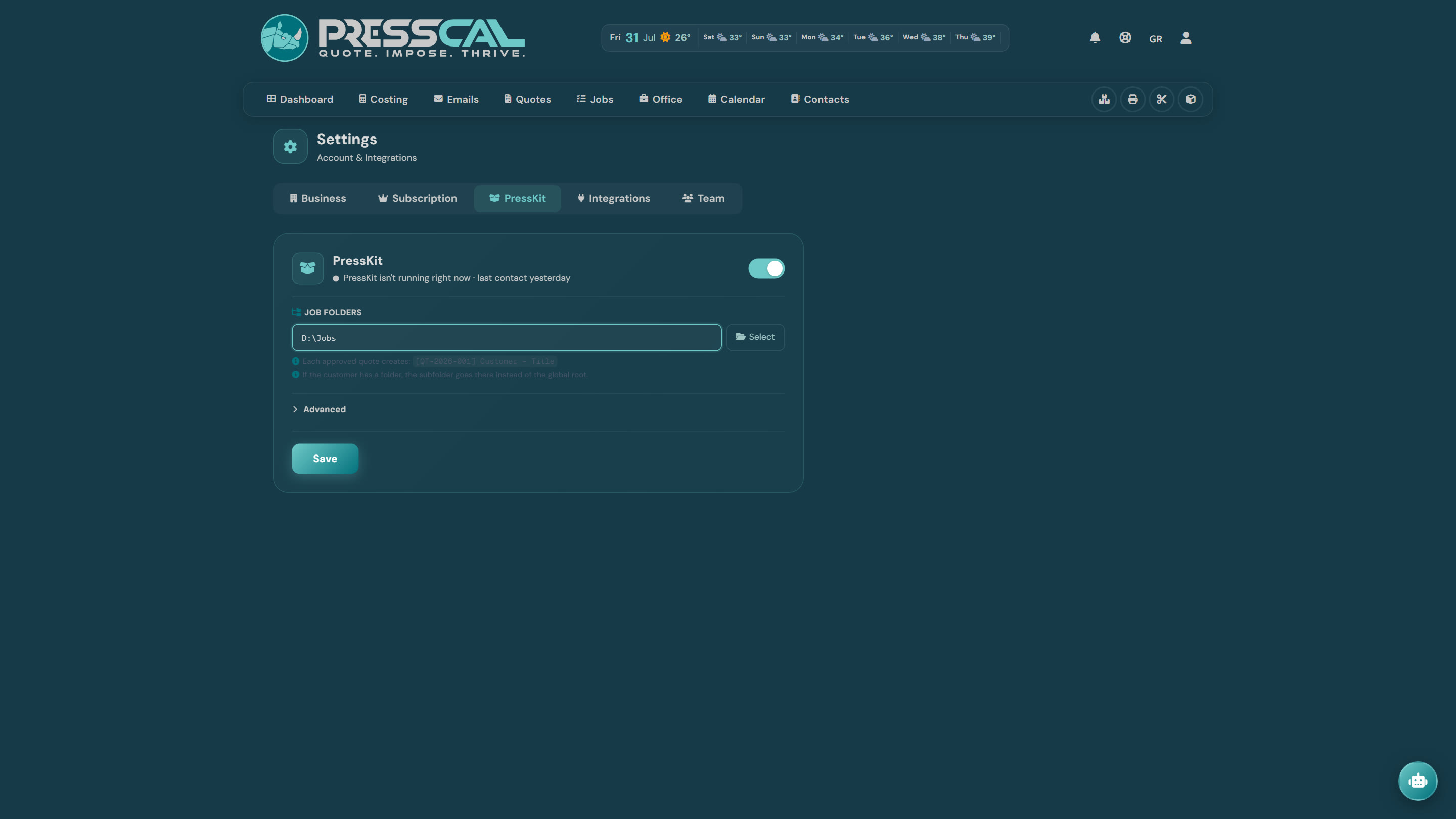
The field you mustn't skip
Once connected, JOB FOLDERS appears — the root where job folders get created (say D:\Jobs). Type it or pick it with "Select", then Save.
With no root there's no folder, and you'll keep seeing "No job folder set". How each folder name is built and what happens on archiving: see the "Smart folders" article.
A second computer
One PC in the office, another at the press? Open "Advanced" and hit "Connect another computer". Same procedure, run from the other machine.
How you know it's working
Above the switch it says either "Connected", or "PressKit isn't running right now" with the time of its last contact. The second one doesn't mean broken — it means closed. Open it and it comes back.
Updates take care of themselves: it checks every two hours, downloads in the background and installs when you close the app. No version chasing.
When something won't work
- Clicking doesn't open it — is PressKit running? Check its licence in its own Settings too.
- I can't see the linked files — give it two or three seconds, or refresh.
- No folder is created — you haven't set JOB FOLDERS.
- Archiving does nothing — PressKit has to be running on the computer that holds the folder, not on another one.